A task in. A branch out.
Aether runs coding agents on a Linux server you own. Each task gets its own container and its own branch. Follow it from any client, answer it when it needs you, and bring the branch back when it is ready.
Set up your first workspaceOne server, and a client wherever you are
The server is a Linux machine with Docker and git. It holds your repositories, runs every agent in a container of its own, and keeps going when your laptop is closed.
You link a machine to it once. The first person to link a fresh server becomes its admin: on a tailnet Tailscale says who you are, elsewhere your SSH key does, or you sign in with GitHub through Aether Edge, which needs no open port on the server. Teammates join after that, by invitation or an admin's approval.
- The CLI
- On Linux, macOS or Windows. Launch runs, attach to their terminals, message agents, pull branches and close runs from a shell.
- The desktop app
- The dashboard in its own window, with a notification when a run needs you. The CLI installs it: on Windows it downloads the release's prebuilt app, on Linux and macOS it builds the app on your machine. There is no installer.
- A browser tab
- The CLI serves the same dashboard from your machine, so the page can pull a run's branch into your clone.
- Your phone
- On a tailnet the server can host the dashboard for any device, and that dashboard in your phone's browser can tell you when a run needs you. The Android app opens it full screen over Tailscale or Aether Edge, and shows no notifications of its own.
Every task runs in its own container
A run is one agent on one task, in a container on the server with its own git checkout and its own branch. Your home on the server is mounted into it, so the agent has its login and your settings. You pick the agent and a mode when you launch it.
- Standard opens the agent's own terminal, as it runs on your machine.
- Enhanced drives the agent over the Agent Client Protocol and shows its plan, messages, tool calls and diffs as controls of their own.
- Background runs the task once with no interaction, then commits, publishes the branch and finishes.
- In every mode the agent works without permission prompts by default. The container is the boundary.
The board shows which runs need you
The board sorts every run into Needs you, Working and Finished. A run moves to Needs you only when a person has to act, and its card says why. Waiting on CI or on its own agents still counts as Working.
- Needs you: the agent asked a question or reported it is blocked. Reply from the card, or open the run.
- Ready for review: the agent reported success. The session stays open, so a message keeps it going.
- Mark complete closes the run as completed. Close records it as merged or abandoned.
- A closed Standard or Enhanced run keeps its container for seven days by default and can be reopened. Its branch stays.
Review the branch, then land it your way
Changes shows the run's branch against the base. Comment on lines and send the comments to the agent as one message. Publish commits, pushes the branch and opens a pull request as the run's account, and the run then shows the pull request's checks. Aether never merges a run for you.
- Pull fetches the run's branch into your clone from the desktop app, the local dashboard or the CLI. It never switches your checkout.
- A failing check or a review comment on the pull request can go to the agent as a message.
- When the pull request merges, close the run as merged.
Keep your own agent
A harness tells Aether how to start an agent's CLI in each mode and where its login lives. Aether ships harnesses for Claude Code, Codex and many more agent CLIs, which the guide lists, and you can register a definition of your own.
Aether installs an agent only when you ask, into your environment on the server.
- Claude Code
--agent claude - Enhanced through an adapter. Login in
~/.claude/.credentials.json - Codex
--agent codex - Enhanced through an adapter. Login in
~/.codex/auth.json - pi
--agent pi - Enhanced through an adapter. Login in
~/.pi/agent/auth.json - oh-my-pi
--agent omp - Enhanced built into the CLI. Login in
~/.omp/agent/ - OpenCode
--agent opencode - Enhanced built into the CLI. Login in
~/.local/share/opencode/auth.json - GitHub Copilot CLI
--agent copilot - Enhanced built into the CLI. Login in
~/.copilot/config.json - Gemini CLI
--agent gemini - Enhanced built into the CLI. Login in
~/.gemini/oauth_creds.json, ~/.gemini/.env - Cursor CLI
--agent cursor - Enhanced built into the CLI. Login in
~/.config/cursor/auth.json - Antigravity CLI
--agent antigravity - No Enhanced mode. Login in
~/.gemini/antigravity-cli/antigravity-oauth-token
Sharing an agent account
You can let a teammate launch runs on your agent account from the Profile dialog. The run is still theirs and runs in their own environment. Your account lends its login, plus your installation of the agent, read-only, if they have none. One shipped agent shares a whole directory rather than a login file; the guide says which.
Account sharing and its boundariesKeep logins on the server
You sign your agents in from your environment terminal, and their logins stay in your member home on the server.
The environment homeEvery run in one window
The desktop app, the local dashboard and the dashboard your server hosts are the same app: a workspace switcher over its runs, the Board and its Map, and for every run its session or terminal, its changes, the files in its checkout and its browser.
Watching a run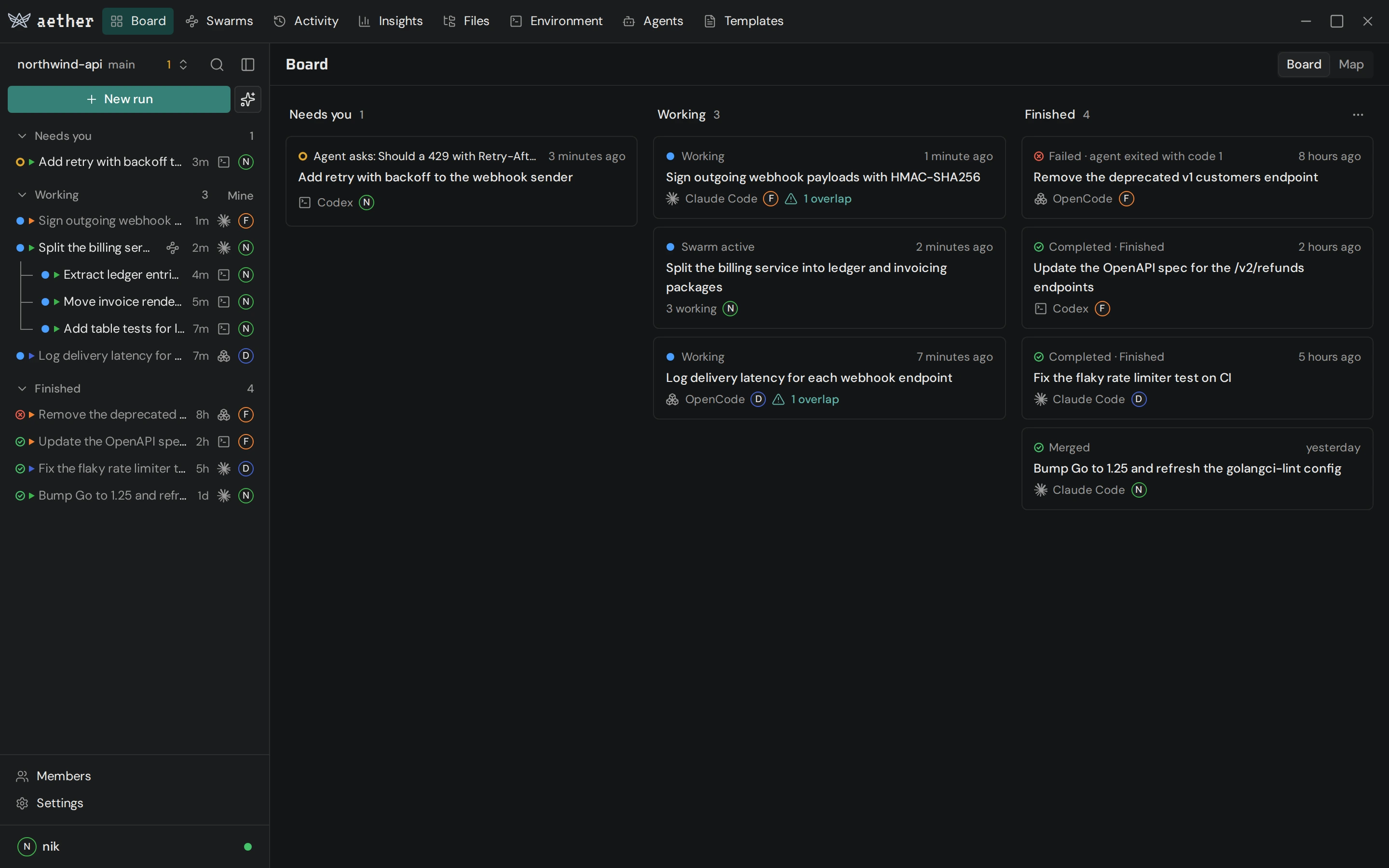
Start with one run
The server needs Linux, Docker and git. Install Aether, then follow the quickstart to connect a client, prepare an agent and review your first branch.
Open the quickstart